How to configure Email Routing for external mail provider
There are a number of configuration changes you'll need to make in order to use your domain with an external mail provider.
Set your Mail Routing to Remote Mail Exchanger
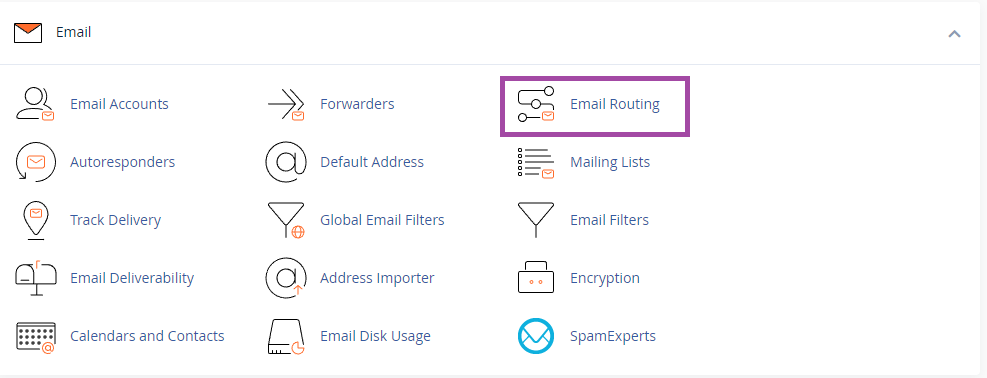
Click Email Routing in the EMAIL section of cPanel.
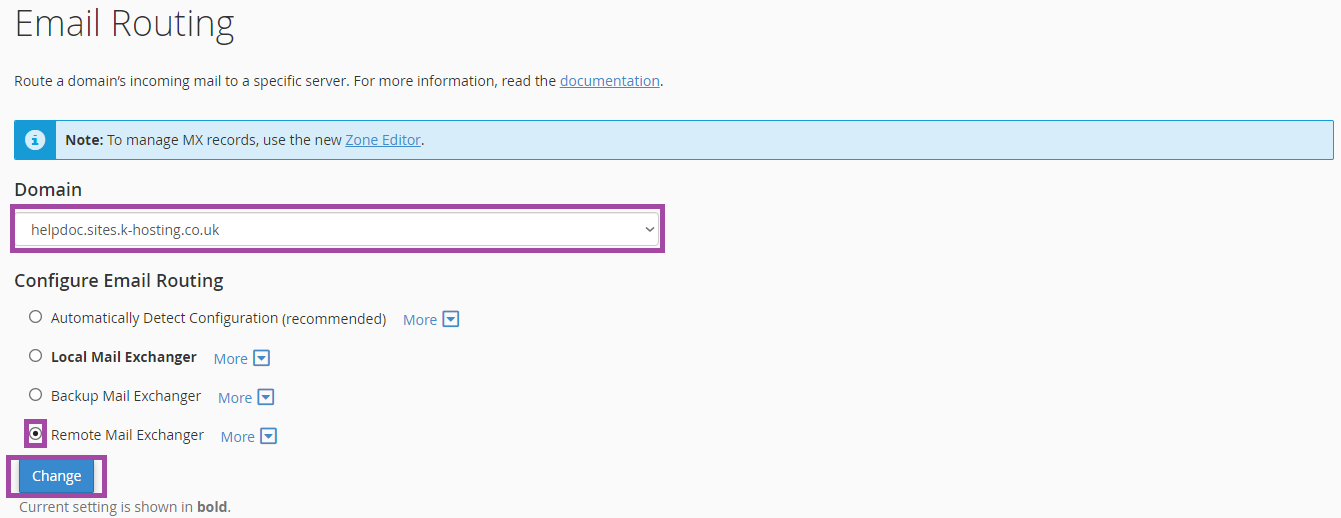
Select the Domain you'd like to use with Google mail/GSuite from the dropdown list. Click the Remote Mail Exchanger radio button. Click the Change button to finish.
The following steps require that you make changes to DNS records. We have a separate article on using the cPanel DNS Zone Editor to make these changes.
Setup MX Records
Remove any existing MX records that are not related to your provider.
Complete the required MX records
Setup SPF, DKIM and DMARC to improve mail deliverability.
Remove any existing SPF, DKIM or DMARC DNS TXT records before adding your entries.
Now add the required entries provided by your chosen email provider.