
When a domain is registered you are required to supply contact information. For .uk domains there is just a primary contact. For most other domains there are four - Owner, Admin, Billing and Technical.
It's really important that you keep your domains contact details up to date to avoid losing your domain - if you can't be contacted at domain renewal time your domain may expire and you may lose it.
You can check and update your domains contact details within your Client Area.
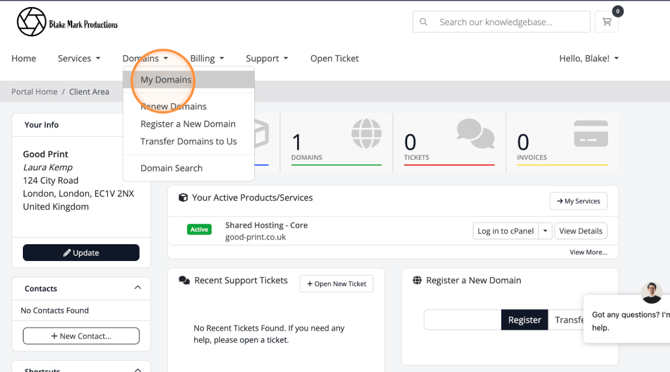
- Once logged in visit My Domains.
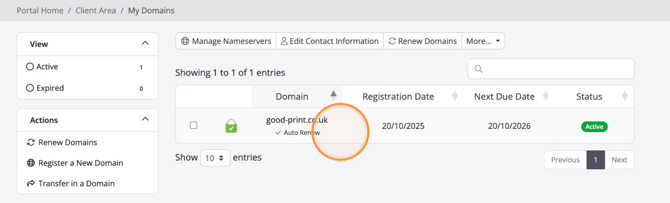
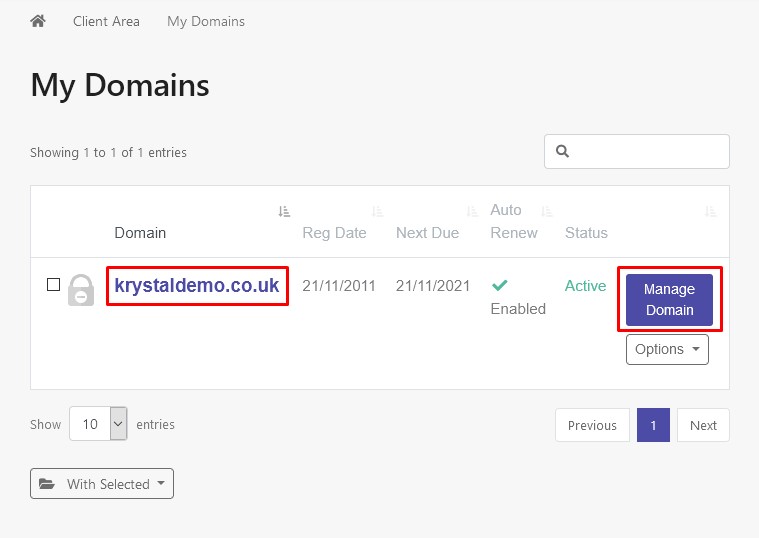
- Click on the domain name or Manage Domain button for the appropriate domain.
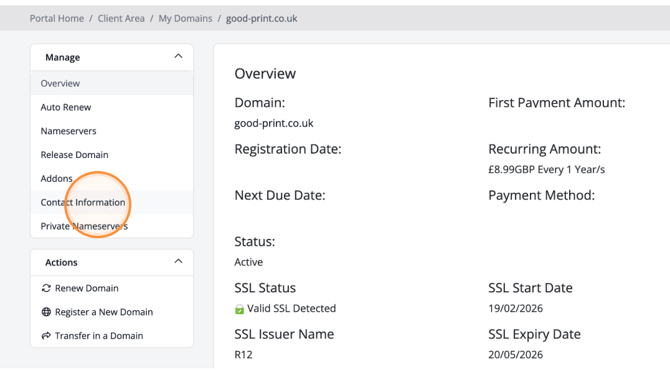
- Then select Contact Information in the Manage toolbar.

For .uk domains you will only see the primary contact.
Changing the primary contact here does not change the Registrant (the domain owner) - that can only be changed via Nominet's online portal and logging in with registrants email address.
For other domains you may see multiple contacts - be sure they are all correct.
For non-UK domains
The domain will be locked for 60 days should you change the domain's registrant contact first name, last name, organisation or email address.
This means you will be unable to transfer the domain away during this period.
These are not terms of Blake Mark Productions, they are defined by ICANN (external link opens in a new window).
This means you will be unable to transfer the domain away during this period.
These are not terms of Blake Mark Productions, they are defined by ICANN (external link opens in a new window).
Click Save Changes to finish